
Executive Dashboard
See income, expenses, bills, savings, debt and free cash in one live command center, with real-time connection status and the controls that drive the planner.
MoneyFlow™ is a live, structured Google Sheets personal finance planner built to help you budget, log and import transactions, manage debt and BNPL, track savings and net worth, monitor due dates, analyze spending patterns and carry financial commitments across flexible planning cycles.

MoneyFlow™ brings budgeting, cycle management, transaction logging, live currency conversion, CSV import, debt and BNPL tracking, savings, net worth and emergency-runway analysis, spending-ratio insights, due dates, rollover, multilingual controls and spreadsheet maintenance into one connected Google Sheets workspace.
See income, expenses, bills, savings, debt and free cash in one live command center, with real-time connection status and the controls that drive the planner.
Switch between Dashboard, Setup & Settings, and Sheet Grid — including a 1:1 map of the planner's MONEY tab ranges from B2:P10.
Translate the live interface across 12 languages and choose from 65+ currencies with native symbols while keeping the underlying financial structure intact.
Use Auto-Detect, currency-synced or selected world timezones, navigate 2020–2035, jump to the current month, and work around your actual financial calendar.
Plan by calendar month, salary cycle or custom date range. Anchor cycles to the 1st, 5th, 10th, 15th, 20th, 25th or 30th and lock the active window when needed.
Set income and savings goals or expense, bill and debt caps directly on the account cards, clear them in one click, and monitor progress with live utilization and status badges.
Compare current figures with the previous month, inspect allocation donuts and stacked commitment velocity, and see exactly where earned income is being directed.
Fetch live exchange quotes for supported pairs, invert the quote, override with a bank or card rate, and preview the converted base amount before logging a record.
Log income, expenses, bills, savings and debt with linked presets, intelligent category detection, due-date offsets, notes, debt frequency/status and BNPL installment steps.
Measure needs, wants and savings/debt against the 50/30/20 framework, track assets, liabilities and net worth, and calculate emergency runway with financial safety tiers.
Surface overdue, due-today, tomorrow and upcoming obligations, then settle supported items directly from the radar. Optional Apps Script integration can sync Calendar events and 8:00 AM Gmail alerts.
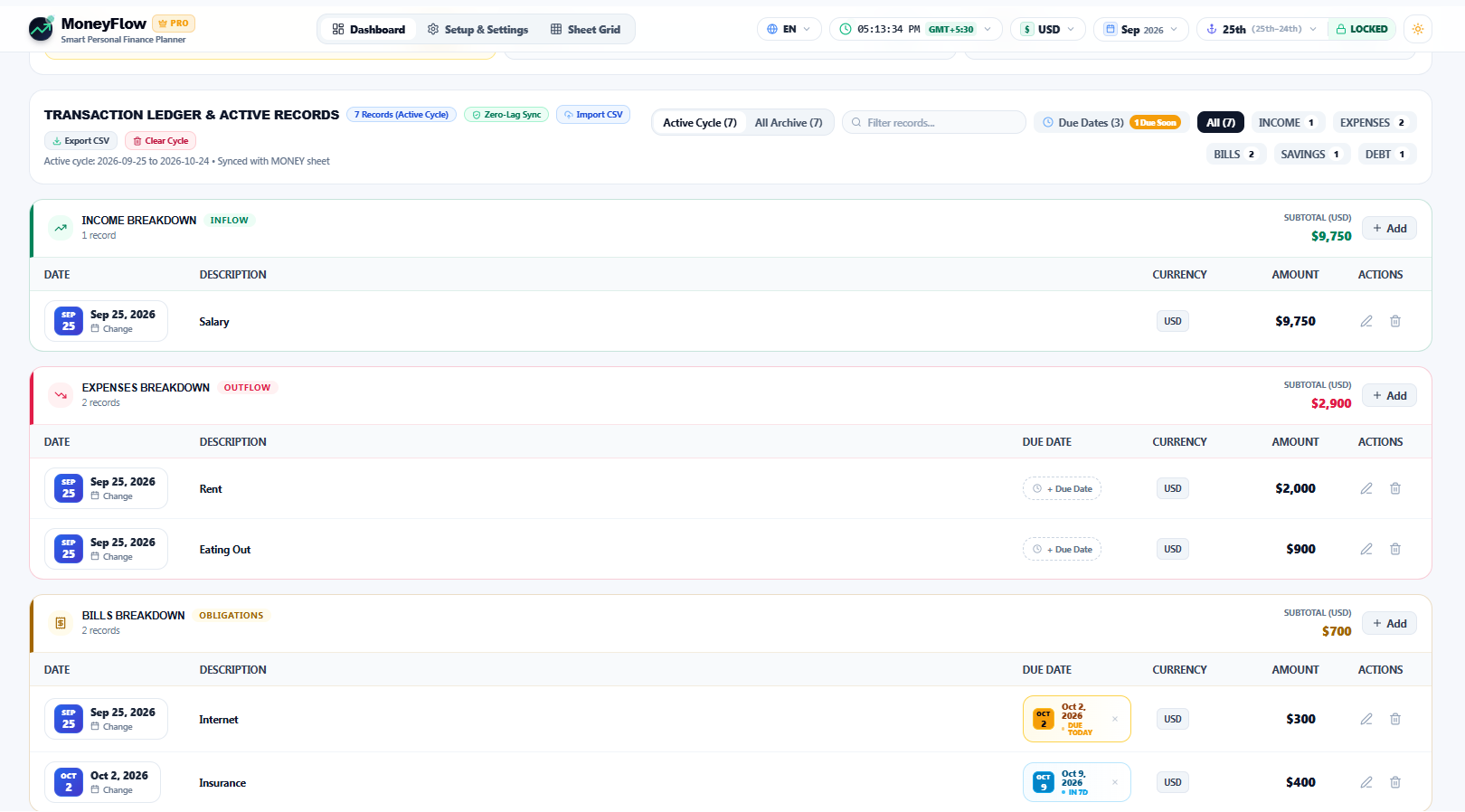
Search across descriptions, categories, accounts and notes; filter by record type, cycle or due date; edit dates and fields inline; delete with confirmation; or clear the active cycle while preserving archives.
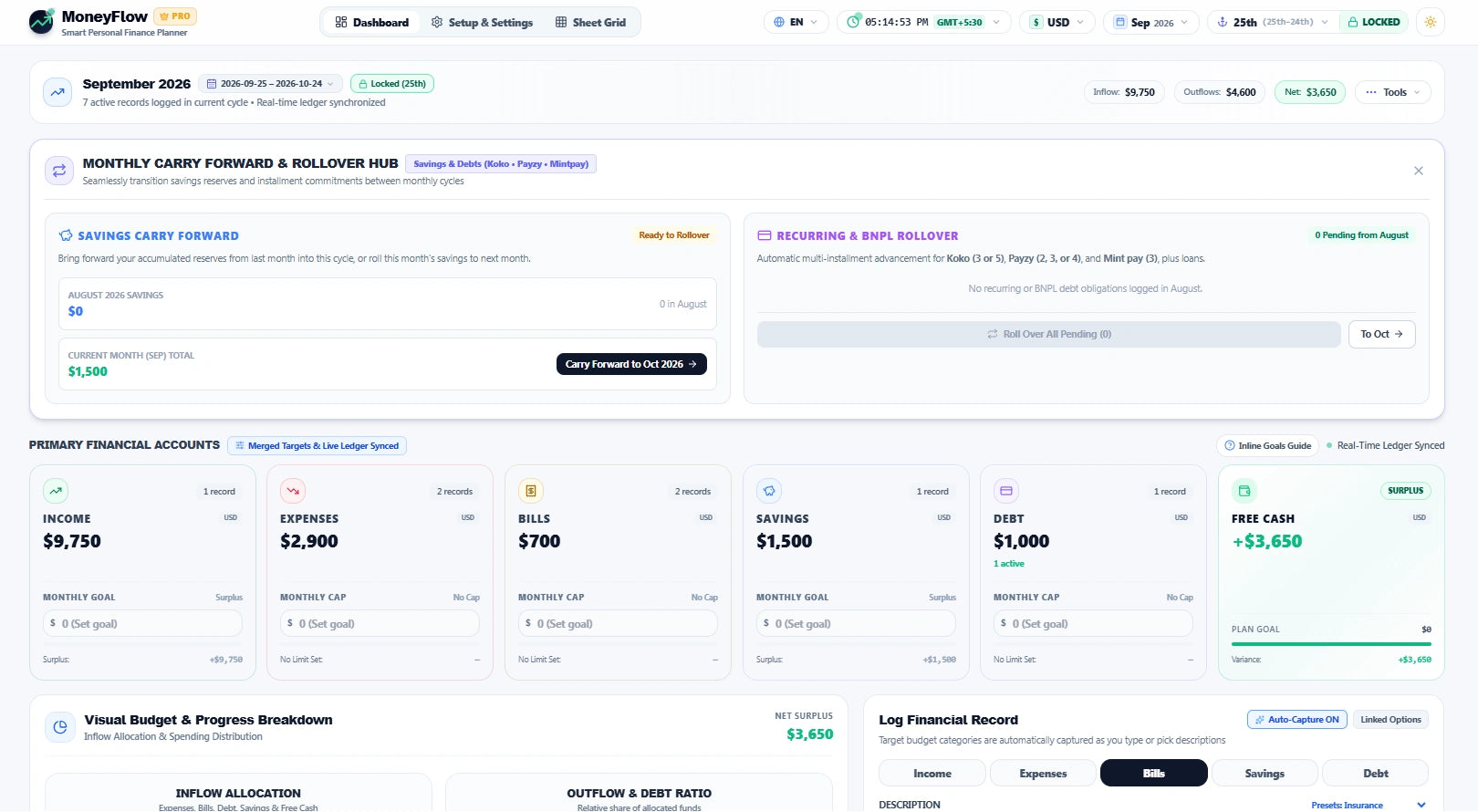
Carry savings reserves and recurring or BNPL obligations into the next cycle, including installment progression, without rebuilding the same commitments manually.
Protect the latest 36 months, recycle older periods gradually, and help shield the workbook from common formula and structural errors including #DIV/0!, #REF!, #VALUE! and NaN.
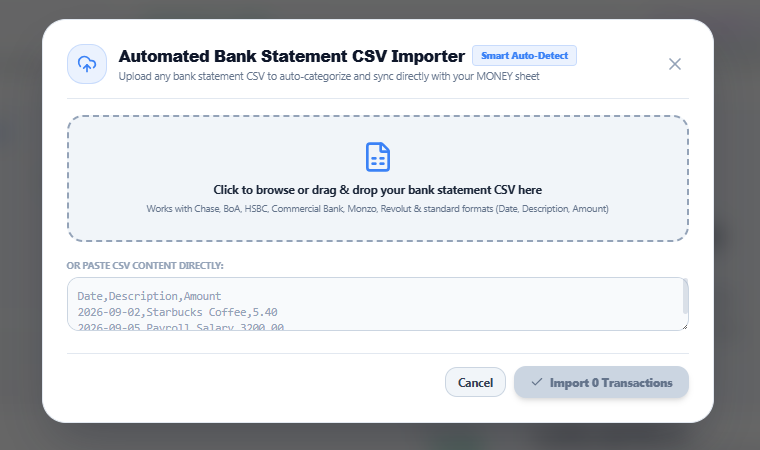
Import standardized bank statements through drag-and-drop or pasted CSV text, auto-detect transaction fields, review the batch before import, and export either the active cycle or full ledger archive.
Use reset controls for monthly targets or full records when you intentionally want to start over, with confirmation steps before destructive actions.
These visuals show the current MoneyFlow™ workspace, including the dashboard, automated CSV import, net-worth and 50/30/20 analysis, payment radar, transaction ledger, rollover tools and regional settings.
See income, expenses, bills, savings, debt and free cash flow alongside budget targets, allocation visuals and the tools that control your active financial cycle.
Review current net worth, total assets, active debt and a multi-period wealth trajectory alongside needs, wants and savings/debt allocation analysis.
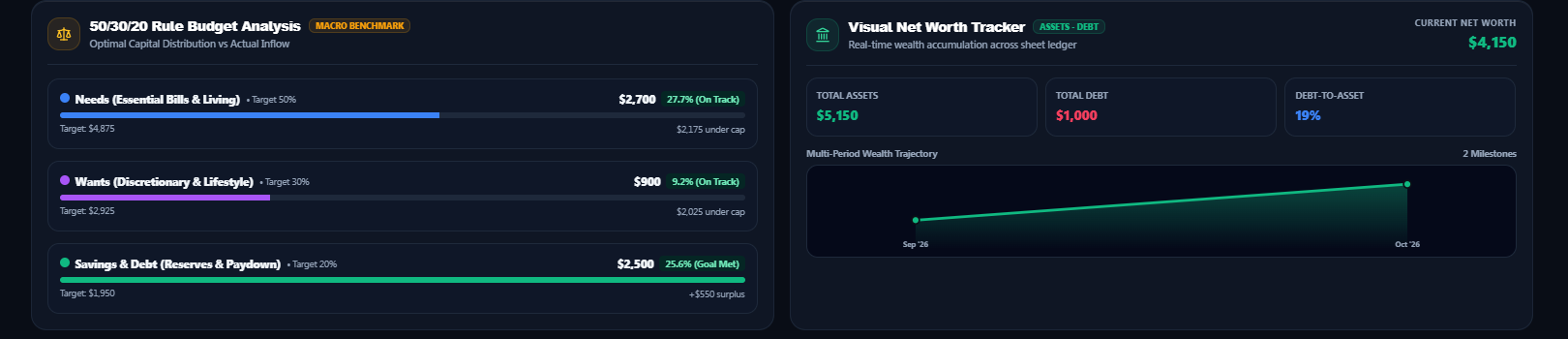
Use 50/30/20 analysis, net worth, debt-to-asset leverage and emergency runway together to understand the strength of your current financial position.
Upload a bank or card statement CSV, use automatic field detection and bring structured transaction data into the MoneyFlow™ workflow.
Surface upcoming obligations and due-date status in one place so bills and other commitments stay visible within the active cycle.

Work with active-cycle and archived records, use category and due-date filters, edit entries and export structured CSV data.
Carry savings reserves and recurring or installment commitments into the following planning period without rebuilding them manually.
Switch between 65+ currency options and 12 interface languages to personalize the workspace for different regions and use cases.

Use the same financial workflow in a clean light interface while keeping the core dashboard controls and calculations intact.

After purchase and delivery, open the Google Sheets template and make your own working copy in Google Drive.
Choose your planning period, currency, language, cycle anchor and monthly income or spending targets.
Record or import transactions, monitor due dates, manage debt and BNPL, track savings and net worth, review 50/30/20 allocation, carry commitments forward and review your financial cycle.
MoneyFlow™ works with a backing Google Sheet and is designed around direct spreadsheet ranges rather than a separate external database. Your working copy is stored in the Google Drive account where you make the copy, subject to Google's services, sharing controls and policies.
You need a Google account with access to Google Sheets. MoneyFlow™ is delivered as a Google Sheets template that you copy into your own Drive.
Yes. MoneyFlow™ supports a standard calendar month, a custom salary or payday cycle such as the 25th to the 24th, and configurable custom date windows.
Yes. The planner includes debt status and frequency controls plus installment progression tracking for supported BNPL workflows, including Koko, Payzy and Mintpay configurations listed in the product specification.
Yes. The current dashboard includes a CSV import workflow designed to map standardized statement fields such as date, description and amount into the transaction ledger, alongside CSV export for active-cycle entries.
Yes. The dashboard includes a visual net-worth view based on total assets and active liabilities, with historical tracking designed to show how the position changes over time.
The dashboard includes an analysis widget that compares the active cycle's needs, wants and savings/debt allocation with the 50/30/20 budgeting framework.
Yes. The current dashboard includes a dual-currency entry workflow with live exchange-rate fetching, quote inversion, a bank-rate override and a converted-amount preview before submission.
Yes. The Emergency Runway Calculator divides liquid reserves by monthly burn rate and presents safety tiers for more than 6 months, 3–6 months and less than 3 months.
Dashboard is the main command center, Setup & Settings is the operating guide and architecture reference, and Sheet Grid maps dashboard cards to the underlying MONEY tab ranges.
Yes. The Payment Due Radar includes the Apps Script integration path for automated 8:00 AM Gmail reminders and Google Calendar event synchronization.
Yes. Monthly targets can be reset from the dashboard, while a separate master reset can clear transaction records and re-zero totals after confirmation.
The current product specification supports 65+ currencies and 12 interface languages, with currency symbols and localized interface controls.
The Sentient Sentry engine is designed around a rolling 36-month protection window, with gradual recycling of older periods rather than an abrupt full-history reset.
No. MoneyFlow™ is a budgeting and financial organization tool. It does not provide personalized financial, investment or tax advice and does not guarantee financial results.
Get MoneyFlow™ for a single payment of Rs 1,990.00. Use your purchased template without a recurring MoneyFlow™ subscription.
Budget, log, track, plan and carry your financial commitments forward from one structured workspace.